
Battery-Saving Master2.0.3 - Get APK
You'll be able to download in few seconds.
Publisher Description
Is a lot more complicated settings!
I tried to make like never heard such a voice was heard somewhere like that, a simple and easy-to-understand power-saving app anyway!
Here is "Battery-Saving Master" Its name.
How confusing a lot of power-saving apps go around the world...
It's no doubt that you forget how you set app setting.
We push "Mode" Function this time.
All you have to do is tapping "Standard Mode" which is set at first.
By all means, please try to use once!
To optimize the power consumption of the terminal functions, the "master" Power saving battery consumption application is stretched to the maximum drive time.
Power-saving mode is recommended because it is standard equipment, smartphone can begin using it immediately and also a good way for beginners smartphone!
[Installation]
Will realize the power savings mode "Recommend Mode" has been registered as a standard mode first!
Please try the "Night Mode" , "Phone Mode" and "Tablet Mode" according to the scene use.
[Next]
Accustomed to the standard mode I try to use the "Custom Mode"!
Decided to set power-saving features, as your own power-saving mode, you can register the name of your choice.
[Welcome to advanced level on smart phone world! 】
Please locate the power saving mode is right for their, and let's enjoy easily saving battery life!
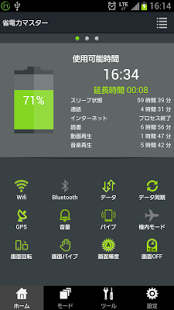
◆About Screen
¶Power-saving Screen
・you can check the remaining time available.
・you can check how long you can use your phone if you use particular function (such as browsing and video calls)
・If you have a separate power-saving features that you want to, you can change the settings by tapping the appropriate icon at the bottom of the screen.
¶Charging Screen
The time remaining until the completion of charging and battery level in% is displayed.
By tapping the charging records at the bottom of the screen, it is also possible to check the charging history of the past.
・Standard Charging
The remaining normal charge until the battery is 80%.
・Adjustment Charging
We will charge a little bit to reduce the amount of charge remaining until the battery is fully charged from 80%.
・Protection Charging
You can prevent overcharging, after fully charged, you extend the life of the battery.
¶Mode Screen
You can use the "mode" has been stored as a pattern of one individual power-saving settings.
Simply select the mode, you can quickly change the power saving method without having to individually set each function terminal.
Use in accordance with the various scene, has been prepared in advance mode that you use frequently.
You can register original mode.
¶Power consumption Screen
We will display the app TOP10 high power consumption during start-up.
You can reduce the power consumption by the task of application termination or high power consumption, uninstall.
¶Setting Screen
Advanced Settings for individual functions can be done from the settings screen.
Future, We will continue to add useful features.
About Battery-Saving Master
The company that develops Battery-Saving Master is smart mobile. The latest version released by its developer is 2.0.3.
To install Battery-Saving Master on your Android device, just click the green Continue To App button above to start the installation process. The app is listed on our website since 2013-09-09 and was downloaded 0 times. We have already checked if the download link is safe, however for your own protection we recommend that you scan the downloaded app with your antivirus. Your antivirus may detect the Battery-Saving Master as malware as malware if the download link to jp.smartmobile.batterydoctor is broken.
How to install Battery-Saving Master on your Android device:
- Click on the Continue To App button on our website. This will redirect you to Google Play.
- Once the Battery-Saving Master is shown in the Google Play listing of your Android device, you can start its download and installation. Tap on the Install button located below the search bar and to the right of the app icon.
- A pop-up window with the permissions required by Battery-Saving Master will be shown. Click on Accept to continue the process.
- Battery-Saving Master will be downloaded onto your device, displaying a progress. Once the download completes, the installation will start and you'll get a notification after the installation is finished.
Program Details
System requirements
Download information
Pricing
Version History
version 2.0.3
posted on 2013-09-09
2.0.3,英語表記に対応しました。,2.0.1,インターフェース、機能、デザインを刷新しました。, ,・使用可能時間表示,・延長時間表示,・電池残量グラフ,・電池情報,・各種節電スイッチ, ,・インストール前状態,・標準モード,・超節電モード,・ユーザーモード,・カスタムモード, ,・SDカードに移動,・キャッシュのクリア,・タスクのクリア,・プライバシー履歴のクリア,・アプリのアンインストール, ,¶節電設定,・電池残量低下時 自動切替,・電波レベル低下時 自動OFF,・指定時刻自動切替,・Wi-Fi自動OFF,・端末水平時自動画面OFF,・アラーム通知,・消費電力Top10,¶クリア設定,・ホワイトリスト(タスク),・ホワイトリスト(プライバシー履歴),・定期自動削除,・画面OFF時自動削除,・自動削除通知,¶その他,・通知バーアイコン
version 1.5
posted on 2013-05-08
Several fixes and updates
Disclaimer
External Download
We do not host Battery-Saving Master on our servers. We did not scan it for viruses, adware, spyware or other type of malware. This app is hosted by Galad and passed their terms and conditions to be listed there. We recommend caution when installing it.
The APK Download link for Battery-Saving Master is provided to you by apps112.com without any warranties, representations or guarantees of any kind, so access it at your own risk.
If you have questions regarding this particular app contact the publisher directly. For questions about the functionalities of apps112.com contact us.
